Hello friends, after a long break!
Today I will be talking about Customizing Pathfinding Cost Calculation in UE5 (A* Heuristic Cost). We will define a new filter and edit the costs of the pathfinding nodes. Then, we will run this custom filter with the “MoveTo” node in the Behavior Tree.
Before we begin, we need to know some navmesh generation techniques and the pathfinding algorithm. First, let’s talk about navmesh runtime generation options. In Unreal Engine 5 (UE5), NavMesh runtime generation options determine how navigation meshes are built and updated during gameplay. The key modes are Static, Dynamic, and Dynamic Modifiers Only, each balancing performance and flexibility for AI pathfinding.
| Option | Description | Use Case |
|---|---|---|
| Static | NavMesh is generated once at build time and never updated at runtime. | Best for fixed/static levels where geometry doesn’t change. |
| Dynamic | NavMesh can rebuild during runtime when geometry or NavMesh bounds change. | Ideal for procedurally generated or destructible environments. |
| Dynamic Modifiers Only | NavMesh is static, but modifiers (like NavAreas or obstacles) can update at runtime. | Useful when geometry is static but gameplay elements (doors, hazards) change. |
Now, I will briefly discuss the basic logic of the A* Pathfinding algorithm used by Unreal Engine.
- Starting Point: The location of the AI.
- Goal: The location the AI wants to reach.
- Open List: Nodes yet to be explored and evaluated.
- Closed List: Nodes already visited.
- Cost Function (f = g + h):
- g: The actual cost from the starting point to the current node.
- h: Estimated cost remaining from the current node to the goal (heuristic).
- f: Total score; the node with the lowest f value is preferred.
In pathfinding algorithms, the node with the lowest f value is selected. Today, we will edit the current cost, of the navmesh nodes. In this way, we will edit our A* path.
So why would we want to update our pathfinding cost?
In this example, we have the following scenario: Let’s say we have a very large navmesh area. And at our level, there are moving objects affecting the navmesh. Of course, to prevent the navmesh from being affected by moving objects, we set the Runtime Generation setting to Dynamic. However, in this case, we observe FPS drops. Continuously editing the navmesh is an expensive process. To solve this problem, we disable the “Can Ever Affect Navigation” setting of our navigating object. However, another problem arises here.
- Since this object doesn’t affect the navmesh, our AI’s path passes through this object. Therefore, our AI collides with this object.
The industry has used some techniques to solve this, e.g., RVO / Detour Crowd (avoidance). However, we can also do this by editing the heuristic cost of the A* algorithm. To do this, we first create our UObstacleNavFilter class from UNavigationQueryFilter. The purpose of deriving it from the UNavigationQueryFilter class is to be able to assign it as a filter to the MoveTo Node in the behavior tree in a blueprint expose manner. The purpose of this class is to introduce our filter to the system and set its necessary parameters. But remember ! This implementation is also costly operation.
UCLASS()
class EXAMPLE_API UObstacleNavFilter : public UNavigationQueryFilter
{
	GENERATED_BODY()

public:

	virtual void InitializeFilter(const ANavigationData& NavData, const UObject* Querier, FNavigationQueryFilter& Filter) const override;

};
void UObstacleNavFilter::InitializeFilter(const ANavigationData& NavData, const UObject* Querier,
	FNavigationQueryFilter& Filter) const
{
#if WITH_RECAST

	Filter.SetFilterType<ObstacleCostQueryFilter>();

	ObstacleCostQueryFilter* DetourFilter = static_cast <ObstacleCostQueryFilter*>(Filter.GetImplementation());
	DetourFilter->SetIsVirtual(true);
	DetourFilter->SetWorld(Querier->GetWorld());

#endif // WITH_RECAST

	Super::InitializeFilter(NavData, Querier, Filter);
}
Now we come to where the real magic happens. We override the “getVirtualCost” function in the ObstacleCostQueryFilter class. This function is a wrapped version of GetCost and essentially gives cost, of our current node to a neighboring node.
In other words, Unreal Engine runs the getCost function during the path creation phase. If isVirtual is true, getVirtualCost is called. Since we override getVirtualCost, A* uses our cost function when generating the path. Additionally, with DetourFilter->SetIsVirtual(true); we tell our filter class that the cost calculation will be virtual!

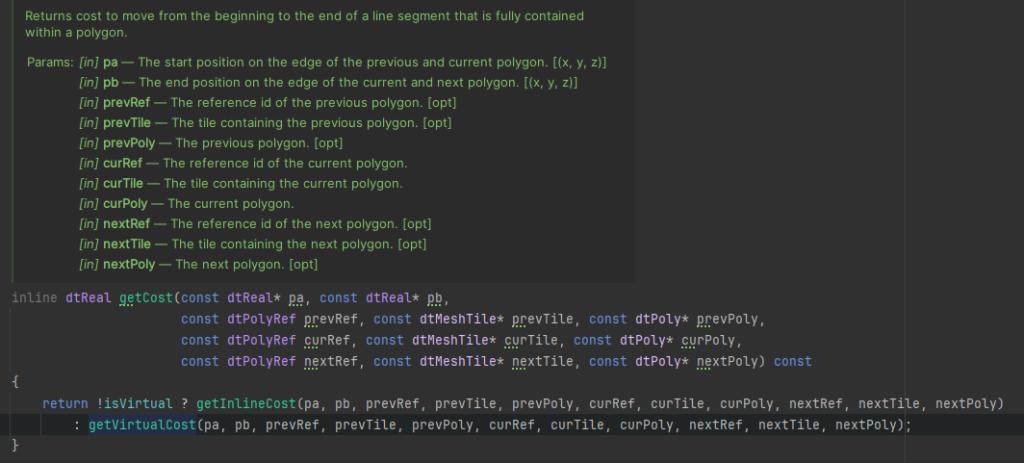
Implementation Our Filter
NOTICE : This is example and not optimized. This aim is how to use it !!!
getVirtualCost calculates the cost between two navmesh points. In addition to the normal distance-based cost, it adds a large penalty for AObstacleActors located near the endpoint and returns the total cost. All AObstacleActor actors on the scene are summed up, and a radius of influence is determined for each using GetSimpleCollisionRadius() * 1.5. If the End point is closer to the actor’s position than this radius, a constant and very large value (9999999) is added to ObstacleCost. The base cost is the product of the distance between the two points and the area cost of the current polygon: dtVdist(pa, pb) * data.m_areaCost[curPoly->getArea()]. If the area change is a constant cost, this is also added. In the final step, ObstacleCost is added to this sum, and the result is returned.
//HEADER

class ObstacleCostQueryFilter final : public FRecastQueryFilter
{
public:
	ObstacleCostQueryFilter ();
	virtual ~ObstacleCostQueryFilter () = default;
	virtual INavigationQueryFilterInterface* CreateCopy() const override;
	virtual dtReal getVirtualCost(const dtReal* pa, const dtReal* pb, const dtPolyRef prevRef, const dtMeshTile* prevTile, const dtPoly* prevPoly, const dtPolyRef curRef, const dtMeshTile* curTile, const dtPoly* curPoly, const dtPolyRef nextRef, const dtMeshTile* nextTile, const dtPoly* nextPoly) const override;
	void SetWorld(UWorld* InWorld);
	UWorld* GetWorld() const;

private:
	UWorld* World;
};// CPP
ObstacleCostQueryFilter::ObstacleCostQueryFilter(): World(nullptr)
{
}
INavigationQueryFilterInterface* ObstacleCostQueryFilter::CreateCopy() const
{
return FRecastQueryFilter::CreateCopy();
}
dtReal ObstacleCostQueryFilter::getVirtualCost(const dtReal* pa, const dtReal* pb, const dtPolyRef prevRef,
const dtMeshTile* prevTile, const dtPoly* prevPoly, const dtPolyRef curRef, const dtMeshTile* curTile,
const dtPoly* curPoly, const dtPolyRef nextRef, const dtMeshTile* nextTile, const dtPoly* nextPoly) const
{
FVector Begin = Recast2UnrealPoint(pa);
FVector End = Recast2UnrealPoint(pb);
// This is example and not optimized. This aim is how to use it !!!
float ObstacleCost = 0;
TArray<AActor*> Obstacles;
UGameplayStatics::GetAllActorsOfClass(World, AObstacleActor::StaticClass, Obstacles);
for (auto& Entity : Obstacles)
{
float Radius = 0;
if (Entity)
{
Radius = Entity->GetSimpleCollisionRadius() * 1.5f;
float Distance = FVector::Dist( End, Entity->GetActorLocation());
if (Distance <= Radius)
{
ObstacleCost += 9999999;
}
}
}
#if WITH_FIXED_AREA_ENTERING_COST
const dtReal areaChangeCost = nextPoly != 0 && nextPoly->getArea() != curPoly->getArea()
? data.m_areaFixedCost[nextPoly->getArea()] : 0.f;
return dtVdist(pa, pb) * data.m_areaCost[curPoly->getArea()] + areaChangeCost + ObstacleCost;
#else
return dtVdist(pa, pb) * data.m_areaCost[curPoly->getArea()] + ObstacleCost;
#endif
}
void ObstacleCostQueryFilter::SetWorld(UWorld* InWorld)
{
World = InWorld;
}
UWorld* ObstacleCostQueryFilter::GetWorld() const
{
return World;
}Debugging
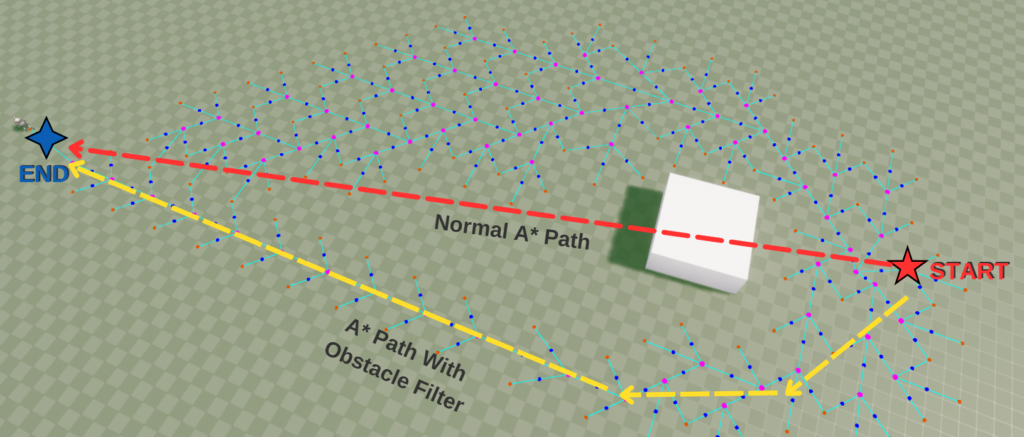
The image below shows a visualization of the normal A* path and the filtered A* path. Since the obstacle doesn’t affect the navmesh, it passes through the normal A* path (red line). This is because the A* algorithm tries to find the shortest path. However, when we use the ObstacleCostQueryFilter we wrote above, our path becomes as shown in the yellow line. As you can see, the obstacle is detected by the filter, and a path is created that goes around it. You can also see blue lines, pink and blue dots in the image.
- Pink Dot : Selected A* node
- Dark Blue Dot : Neighboring A* nodes
- Blue Lines : Line showing the neighbors of the selected node
With this debugging process, we see the spread of the A* path. Because we set the costs of the nodes to (99999) where the obstacle is located, the algorithm skips those points. The image below shows the A* nodes formed around the obstacle.
Finally, thank you for reading this far. I hope this has been a helpful article. I welcome your questions and comments below. Also: You can go to my previous article from here.
REFERENCE :
1- https://paviliondv7.hatenablog.com/entry/2020/09/26/150736
2- https://dev.epicgames.com/documentation/en-us/unreal-engine/overview-of-how-to-modify-the-navigation-mesh-in-unreal-engine